Introduction
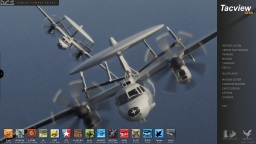
Get ready for an all-new Tacview experience with Tacview 2!
We've been listening to your feedback and are excited to bring you an enhanced experience. Whether you're a gamer or a professional pilot, Tacview 2 has something new for everyone.
Cross-Platform Support
Soon, you'll be able to access Tacview on a broad range of devices—from Windows to mobile platforms like iOS and Android. Picture debriefing your latest flight while riding the bus!
Content Sharing
Easily integrate custom content and addons. Imagine downloading new terrains instantly through platforms like the Steam Workshop.
Enhanced Graphics Engine
Our upgraded engine offers improved performance and more realistic visuals, helping make your after-action reports even more insightful.
Enhanced Customization
With Tacview 2, we're handing you the keys. Customize almost every aspect of Tacview through addons to make it yours, thanks to new scripting capabilities and developer tools.
Please, feel free to post any suggestions and remarks – regardless of your aircraft or simulator – on the official threads:
Interface
Yes, indeed! This is a feature that has been requested for quite some time, but it would have required a complete overhaul of the rendering engine. Tacview 2 has been rebuilt from the ground up, and its new 3D engine can display as many views as your system can handle. This means you will be able to display all the 3D views and tools you need across multiple monitors.
Yes. Assuming the player names have been properly recorded in the flight data, you will be able to quickly look up any player, and Tacview will also attempt to track the same player across multiple respawns during an online session.
Tacview 2 will include comprehensive, integrated hypertext documentation. As we develop each component and feature, we are updating the corresponding technical reference documentation. Because ergonomics are not yet finalized before the first stable release, the user guide will come later. In the meantime, users can consult and contribute to the wiki.
In Tacview 2, users will be able to chart any telemetry data, not just predefined ones like in Tacview 1.x. If a telemetry value is not recognized by Tacview, you will be able to manually specify its unit of measure and adjust drawing parameters to obtain the best result.
Because Tacview is not a simulator, it does not inherently simulate a fog of war. However, if the source data includes this information, we may consider integrating it. Instead of making objects invisible, the plan would be to display them as hidden based on the perspective of selected objects.
Definitely! Tacview 2 will support both light and dark operating system themes, and will also offer multiple skins. Skins will be customizable through configuration files and will eventually be shareable with the community.
Although the current icon is still appreciated, it is likely to be redesigned for Tacview 2.0 so users can clearly distinguish between the two generations of Tacview.
Visual Experience
Yes! This feature was not available in Tacview 1 due to technical limitations. However, the redesigned terrain engine in Tacview 2 makes it possible to overlay multiple textures with different resolutions, blending them seamlessly based on the zoom level.
In Tacview 1, terrain management relied heavily on the CPU and consumed a large amount of memory, which limited both visual detail and performance. Tacview 2 shifts most of the workload to the GPU, reducing memory usage and improving speed. Expect more detailed textures, smoother transitions, and enhanced visual effects for a clearer and more immersive debriefing experience.
Not at launch. However, the new 3D engine is designed to eventually support VR headsets on Windows and Linux, likely through OpenXR. It will simply involve opening a dedicated VR viewport. VR support for macOS is also being considered, but it is too early to provide details.
Licensing & Upgrades
If you have a Tacview 1 license, it will be compatible with Tacview 2 for desktop editions (Windows, macOS, and Linux). This means you can enjoy the same advanced features you're used to, along with improved ergonomics, performance, and detail at no additional cost. Over time, new advanced features will be introduced, and you will be able to access them by upgrading your existing license.
Please note that iOS and Android versions of Tacview 2 will require separate licenses, as they involve significant development work and will be available through different app stores than the desktop editions.
Flight Data Recording
While Tacview is already capable of displaying a sensor's field of view, this information is not yet exported from flight simulators like DCS World. We hope that when we rewrite the exporter, we will find a way to extract this information so it can be visible during debriefing.
Potentially. As part of Tacview 2's later development stages, we're aiming to overhaul the DCS telemetry exporter. This means, if things go according to plan, we'll not only be able to gather data from a broader range of aircraft but also ensure this data is more accurate.
This is a feature we've always wanted to implement, but we've been hindered by a lack of necessary data. We plan to rewrite the DCS World exporter for Tacview 2 with a goal of obtaining more data from moving objects. Additionally, we aim to access mission data, which will enable us to export key static map objects like buildings and bridges. While we cannot guarantee success, we are certainly going to make every effort to make it possible!
Yes! We plan to update the exporter for improved usability during multiplayer sessions. After a real-life time delay set by the server, you'll be able to review your entire flight without the need to stay connected for extended periods.
Currently, we have maximized performance as much as possible on our end. Tacview exporter code takes a negligible amount of CPU, the remaining performance issue lies within DCS World Lua interface.
For much more details, see the post on that matter: FPS Loss While Recording Your Flight in DCS World
Now, with Tacview 2, we are considering the development of an official third-party paid exporter, which could – in theory – grant us access to more powerful tools, not only to export more data, but also to get better performances out of this process. Do not worry, the standard exporter will always be available at no extra charge.
Tools
Yes, Tacview 2 will support both Web Map Service (WMS) and Web Coverage Service (WCS). In other words, it will be able to load mapping, satellite, and elevation data to display real-life terrain, similar to other tools such as Google Earth.
Absolutely. During an online debriefing with Tacview 2, any participant can seamlessly download the necessary flight data from any other participant in the background. This allows for just a single person to need to record the flight, thereby streamlining the online debriefing process like never before!
Telemetry and multimedia are two very different types of data. While telemetry data is relatively light and can be easily handled and transferred by Tacview, multimedia files are typically much larger. Transferring them during an online debriefing would require a specialized solution which falls outside of Tacview's scope. Therefore, while it may eventually become possible, this feature is likely to be part of a future update.
While we can't guarantee this functionality will be included in the initial release, it's definitely something we can implement. At a minimum, there would be an option to select which objects should be added or merged with existing ones. More advanced processing could potentially be managed via a custom Lua script.
Miscellaneous
Indeed, with Tacview 1, the majority of the space is consumed by terrain and maps for various simulators, while the rest of the program hasn't grown significantly in size. Tacview 2 is introducing a new data management approach, allowing for on-demand installation of various packs. Although the final solution has not been determined yet, the base Tacview 2 will be considerably smaller, with the flexibility to install additional packs as needed, possibly through platforms like the Steam workshop.
Compatibility
It's a bit challenging to provide an exact answer at this early stage of development. Tacview 2 is being completely redeveloped to optimally utilize the latest CPUs and GPUs. This implies that, on comparable hardware, it should operate as efficiently as Tacview 1, if not more so, due to its enhanced resource management capabilities, such as extensive multithreading.
Nevertheless, it's important to note that Tacview 2 will necessitate a GPU that's compatible with the Vulkan 3D API and a fairly recent version of Windows, likely Windows 8.1 or later. So, while Tacview 2 is designed to make the most of your system's capabilities, it will require a relatively updated setup to run.
Yes, Tacview 2 will be compatible with your current acmi 2.x files!
Tacview 2 introduces an improved acmi file format that offers additional telemetry types and easier implementation for third-party programs.
Over the years, there have been several iterations of the acmi file format:
- The old (1.x) binary format, which hasn't been used for almost a decade, will not be supported by Tacview 2.
- The first text iteration (1.x) of the acmi file format is also not planned for support in Tacview 2.
- However, the current major revision of the acmi file format (2.x) will be supported by Tacview 2, ensuring all flights you're presently recording can be seamlessly viewed in the new version.
Please note that the new acmi file format introduced by Tacview 2 will not be supported in Tacview 1. It would require significant effort and would not be practical, as Tacview 2 offers many more capabilities.
Tacview 2 will be able to run on macOS and Linux. While it is developed on Windows, its engine is fully portable and runs well on Linux, including Ubuntu, Debian, and even Raspberry Pi.
The 3D engine of Tacview 2 is programmed using Vulkan, which needs to be ported to macOS. However, the core engine of Tacview 2 already works natively on the new M1 Macs.
We are working hard to make sure that Tacview 2 can be supported on all the main operating systems. At launch, Tacview 2 will be released for Windows first, followed by Linux, macOS, iOS, and then Android. To ensure everything runs smoothly, we'll fix any bugs on each platform before releasing the next one.
While there is a possibility for the real-time telemetry protocol to evolve, there are currently no plans to upgrade it in the short term. Upon the release of Tacview 2, the ACMI file format will be updated to version 3. However, Tacview 2 will continue to support real-time telemetry data using the current protocol and format.
Extensions & Developer Tools
Yes. Everyone will be able to create and share add-ons easily, whether it's improved textures, new terrain, 3D models, or even new tools.
You do not need to know any technical details to install an add-on: Just download a ZIP file and open it with Tacview to install it. Even better: we are also planning to support Steam Workshop, enabling users to comment, vote, and share improvements and new content with the whole community.
Absolutely! In Tacview 1, the concept of add-ons was introduced after the project was already mature, which made addon development somewhat limited and less accessible than it could have been. Tacview 2, on the other hand, has been designed from the ground up with add-ons in mind. This approach makes it much easier to create them and customize almost any part of the program.
Language support is more robust as well; beyond Lua, C++, and C#, we're planning to add support for JavaScript and Python. If you're working with C++ and C#, you'll find creating and developing projects much easier than before. We have even planned a Lua debugger, and our integrated HTML documentation will clearly present all the tools and concepts at your disposal, along with nice examples, making the development process more accessible and efficient.
Possibly, with modifications. Tacview 2 represents a comprehensive rewrite of the original program, bringing along with it an improved Software Development Kit (SDK) offering more features and usability compared to Tacview 1.
Existing add-ons will require modifications to function within the new application and to harness the potential of the updated API. However, this process is anticipated to be straightforward due to the unified, simplified API and forthcoming associated tools, such as a Lua debugger.
Additionally, we are considering the introduction of a compatibility layer. Still, minor changes will be necessary for Tacview to properly recognize and load the older add-ons.
Absolutely! The Tacview 2 Lua SDK is designed to be versatile and will include an API for straightforward handling of HTTP and HTTPS requests. This will be particularly useful for loading custom terrain and textures from mapping services such as OpenStreetMap.